Blog

Create a quiz in Excel

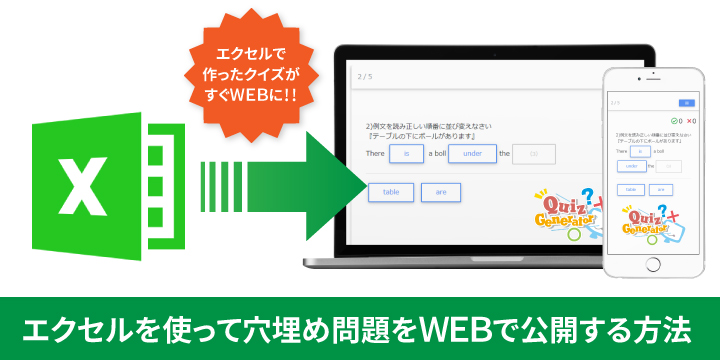
How to use Excel to publish fill-in-the-blank questions on the web

This is Kitaoka🍎, our marketing manager. In this article, we will show you how to create fill-in-the-blank questions that you can easily publish on the Web using our quiz creation tool, QuizGenerator, and an Excel file. Using this quiz creation tool, you can easily introduce and publish your web quiz on the Internet. Please refer to this article to find out how to make a web quiz and how it works. Table of Contents 1. using QuizGenerator and Excel, you can create a web quiz! 2. let's make a fill-in-the-blank question using Excel 3. use the conversion tool to turn your quiz into a web quiz 4. summary With QuizGenerator and Excel, you can make a WEB quiz! If you have learning materials or interesting quizzes but are having trouble finding a use for them! Why don't you publish your quiz on the Internet using our QuizGenerator? You can use our Quiz Generator to publish your quizzes on the Internet. Quizzes created with QuizGenerator can be enjoyed from any device, including PCs, smartphones and tablets. Do you have any of the following problems? I want to set up a quiz on the web. 、、、、、 → I don't know how to do it. Is it difficult to post a quiz on the Internet? I want to use quizzes to promote my company or school as an advertisement. 、、、、、 → I gave up because advertising costs money and personal use is a hurdle. I want to focus on training new employees and employee education. 、、、、、 → We rely only on existing training materials, and internal training has become chronic due to lack of progress. For those in charge of such problems, our e-learning system can solve the above problems! No problem even if you are not familiar with computer operation. It is very simple to create! There are no complicated operations. Just follow the specified format and type in the questions and answers to create your quiz as you wish. What's more, QuizGenerator is free of charge. Here are the features of QuizGenerator QuizGenerator allows you to create quizzes from more than 12 different question types and publish them on the web! You can create a quiz on the web in 3 easy steps. Quizzes can be created in 3 easy steps. Quizzes can be managed by our e-learning system (learningBOX). *......QuizGenerator is suitable for distributing quizzes to an unspecified number of users, but learningBOX is more recommended for use in in-house training, certification exams, and schools. learningBOX allows you to create and edit your quiz in a single step, and you can also edit your quiz in the quiz. LearningBOX allows you to easily re-edit your quizzes in the browser. In addition to offering course study to learners, you can also manage each person's grades, retake tests, pass notifications, and other detailed settings! If you are having trouble finding a place to put the quizzes you have created, please feel free to use learningBOX. If you also want to manage grades and learners, please visit our e-learning system, learningBOX! Let's make fill-in-the-blanks questions using Excel! ▼QuizGenerator allows you to create quizzes from three sources: a text file, Excel, and a question form. This time, I would like to use Excel, which is included in almost all computers, to create a question. Follow the format below, and enter the question text, question format, and answers. Please refer to the sample example (Fill-in-the-blanks question) below. You can download the sample here →. A B C D E F 1 #format:table 2 #messages_intro: fill-in-the-blank questions 3 #shuffle_questions:false 4 #mode:master 5 #movable:true 6 1) Read the example sentences and rearrange them in the correct order.<br>I love music."<br>{1}{2}{3} wordbank: I like music 7 2) Read the examples and put them in the correct order.<br>'The ball is under the table.'<br>There {1} a boll{2}the{3} wordbank: is under table are 8 3) Please rearrange the sentences so that they are correct regarding Article 25 of the Constitution of Japan.<br>"Every {1} has the right to live a {2} and {3} decent {4} life." WORDBANK: people health cultural minimum 9 4) Kinkakuji Temple was built by the third Shogun {2} in the {1} era. wordbank: Muromachi Ashikaga Yoshimitsu Kamakura Ashikaga Yoshimasa 10 5) Rearrange the order so that carbon burns to carbon dioxide.<br>{1}+{2}→{3} wordbank: 2H<sub>2 </sub> 0<sub>2 </sub> 2H<sub>2 </sub>O H Here are the points The first line, starting with #, is the setting for the entire question. #format:table in the first line declares that the question data is to be written in tabular format. 5. Each line contains the question text, "wordbank:", the correct answers starting from {}, and dummy choices, separated by tabs. In the following example, the problem statement for the first question is "Read the examples and rearrange them in the correct order: 'I like music' → {1}{2}{3} The correct answer choices are {1} is "I" {2} is "like" and {3} is "music". br" means a line break; "sub" means the text is displayed as subscripts. Use the conversion tool to turn your quiz into a web quiz ▼Select the question data you have created and click the "Convert" button to generate a quiz player. ▼Limited publication → Only those who know the URL can view the quiz. By copying and pasting the embedding tag (IFrame), you can put your quiz on your blog or website. Conclusion In this article, we have shown you how to create a quiz using our quiz generator tool, QuizGenerator, and an Excel file, and how you can easily publish your quiz on the web. If you have learning materials or interesting quizzes, you can use QuizGenerator to create them. If you have learning materials or interesting quizzes but are having trouble finding a use for them! QuizGenerator is a free web service that you can use for free. Why don't you take this opportunity to create your own quiz? Thank you very much for your cooperation.

How anyone can easily publish 0× problems on the web

My name is Kitaoka🍎, and I am in charge of marketing. In this article, we will show you how to create and publish OX questions (Marubatsu questions) on the web easily using our quiz creation tool "QuizGenerator". Using this quiz generator, you can easily publish your quiz on the web even if you have no programming knowledge! This tool is perfect for those who want to set up exam questions on the web, conduct web exams to understand company training content, or study hard in their spare time or on the move as a daily study aid. The usage is flexible! You can use it in any way you like. We hope you will try our web quiz with this article as a reference. Table of Contents What is QuizGenerator? 2. Let's try to create a 0x00 question using QuizGenerator. 3. The procedure for creating a web quiz is like this Summary What is QuizGenerator? QuizGenerator is a quiz question generator for PC and smartphones (iPhone, iPad, Android). Even those who do not know programming can easily create quizzes with a wide variety of question types. QuizGenerator is a quiz creation tool that is compatible with SCORM1.2 and SCORM2004, the e-learning standard. Here is a quiz created using this feature. Click on the "Solve Quiz" button to open the player screen and experience the web quiz. QuizGenerator allows you to create quizzes from more than 12 different question types! Let's make a ZX question using QuizGenerator! QuizGenerator offers more than 12 different types of quiz questions. You can create quizzes in a variety of formats, including multiple choice, true-false, fill-in-the-blank, multiple choice, short answer, and reported questions. In this article, we would like to try to create a quiz with the "0x" type of questions, which are often seen on TV and quiz shows. Here is what you need to prepare for your quiz! POINT ☑Please prepare an internet connection! ☑You will be using a computer to create and edit your quiz! ☑If you have a draft of the quiz, you can start working on it right away! The procedure for creating a web quiz goes like this ▼QuizGenerator allows you to create quizzes from three types of files: text files, Excel, and question creation forms. This time, we will use a text file to create 5 questions about prefectures. Here are the settings and rules for creating a quiz! Enter the question text, question format, and answers according to this format. Please see the sample example (〇✖ questions) below. 1) The world's three greatest delicacies are "foie gras, caviar, and truffles". true-false: true true That's all! Now, let me explain in detail. 1) The world's three greatest delicacies are "foie gras, caviar, and truffles" → Enter the question true-false: → Enter the format of the question (in this case, correct or incorrect) true: → Enter the answer (0 is the answer for this question) Review The first line should contain the question text, the second line should contain "true-false:", and the third line should contain "true" if the correct answer is "○" and "false" if the correct answer is "×". A blank line should be inserted between questions. In this example, the first question should read, "The world's three greatest delicacies are 'foie gras, caviar, and truffles.'" and 0 is the correct answer. ▼ Let's actually make a quiz based on the sample example above! Here is the quiz The prefecture with the largest area among prefectures is Hokkaido → 0 The prefectural capital of Hyogo Prefecture is Himeji City → ✖ The name of the governor of Aomori Prefecture is Shingo Mimura → 0 Okinawa Prefecture was chosen as the most attractive prefecture in 2019. The name of the governor of Aomori Prefecture is Mr. Shingo Mimura → ✖ ▶ Watch the video of the quiz from its creation to completion Click here to watch the video. If you have difficulty viewing the video, please click the full-screen button in the lower right corner and maximize the screen size! ▶Here is how to publish on the web! You can solve the quiz we have created here. ➡You can also set a URL link in the text like this, and only those who click here can solve the quiz. Conclusion In this article, we introduced how to create and publish OX questions on the web easily using our quiz creation tool, QuizGenerator. Using this quiz generator, even those with no programming knowledge can easily publish quizzes on the web. The quiz created here can also be posted on the website as learning contents or quiz contents. Although we could not introduce it in this article, QuizGenerator allows you to set your original option values! Here is a list of optional features available in QuizGenerator. We hope you will take advantage of these optional features when creating your quizzes. Thank you very much for your patience.

Renewal of Question Form of QuizGenerator

QuizGenerator's question creation form has been renewed to learningBOX specifications. The question creation form on QuizGenerator.net has been changed to the learningBOX-specification quiz creation form in accordance with the 2.8 version upgrade of learningBOX. Overview of the renewal With this renewal, the question creation form on this site, Quizgenerator.net, will also evolve with each version, along with the version upgrade of the LMS, learningBOX. In addition, this is an opportunity to register and use the e-learning system leaningBOX without changing the owner registration (administrator registration) to leaningBOX after creating a question from the question creation form. We hope that creating quizzes with QuizGenerator will be an opportunity for you to learn about and utilize e-learning. Introducing the flow after the renewal of QuizGenerator Files created in text and Excel can also be uploaded, edited, and made available to the public. Discover the advantages of using learningBOX 1. easy re-editing of questions. With Quizgenerator alone, you may have stored your quiz data locally, but with learningBOX, the questions you create are stored in the cloud. It is also easy to further re-edit those questions. 2. learner management and grade storage. The system has a learner (member) management function, which allows you to save scores and other results from quizzes you have created, and to check the level of understanding and learning progress of your students. The free plan allows up to 10 accounts to be registered, so you can have one administrator and the other 9 learners. You can create and register various contents. In addition to quizzes, a variety of content is available, including study materials such as videos and PDFs, study aids such as memorization cards and bug-eaten notes, and certificates. 4. e-learning courses can be created. You can create e-learning courses by combining various contents. Please use this service for corporate training, certification exams, distance learning, etc. For those who have created quizzes using the question creation form on this site Please register as a learningBOX owner. The instructions for downloading your questions after registering on learningBOX and embedding your quiz into your website after creating it are described below. How to download created questions ➡Editing questions once created How to embed questions created using the question creation form in QuizGenerator into your website ➡How to embed questions in your website

Batch generation of calculation problems

Good morning, this is Nishimura from QuizGenerator Fresh out of the box. In this article, I will show you how to make calculation questions in QuizGenerator at once. Let's make a QuizGenerator question file. I was going to write an article on how to create SCORM teaching materials, but it is quite difficult to create SCORM-format teaching materials from scratch. So, this time, I would like to try to generate QuizGenerator question files automatically. (It would not be appropriate for this article to be posted on this site if I made it from scratch.) Creating with JavaScript There are other ways to create a question file at once, such as using Excel, PHP, or Python, but I prefer to do it easily in a browser, so this time I will try to create it in JavaScript. What is a calculation problem? A calculation problem is a problem that requires the user to answer the result of a mathematical equation, but since we do not want to do anything too complicated, we will use two numbers connected by one of the symbols +-✕. We will also adjust the difficulty level by specifying a range of two numbers. Creating a function We will create a function to generate a calculation problem. Let makeQuiz(min,max,op) be a function to generate data for one question and makeQuizN(min,max,op,n) be a function to generate data for n questions. The arguments of makeQuizN are as follows min: lower limit of value: integer max: upper limit of value: integer op: type of operator: "+" or "*". n: number of questions: must be greater than or equal to 1 The code is as follows Adding UI Vue and React are all the rage these days, but let's dare to do it with jQuery. Done! Number of questions: Min: Max: Operators: + * Let's publish! You can upload and publish the educational material files you have created to the QuizGenerator conversion screen. Please use an Iframe-compatible browser to view the file. Register your materials in the learningBOX! You can register your materials in learningBOX as QuizGenerator teaching materials. learningBOX can be assigned only to specified learners, and you can also keep a record of their learning. Next up. In this article, we have specialized in addition and multiplication, but it would be more convenient to have subtraction and division as well, so we will include all four arithmetic operations. Also, since these are calculation questions, we plan to make it possible to select not only the choice, but also a written question. In the next few weeks or so, I plan to write an article that is a bit closer to SCORM. Conclusion This time, I created a question file for QuizGenerator using javaScript, and since QuizGenerator can create questions in a text file, you can use not only JavaScript but also Excel or some other programming language to convert existing content into SCORM materials. You can use not only JavaScript but also Excel or any other programming language to convert existing content into SCORM materials, or to generate a large number of questions based on a certain set of rules. When creating something, instead of creating everything from scratch, you can maximize results with minimal effort by linking it to an existing system. We want to reuse it! The complete source code for this project is available on GitHub, so please feel free to use it.

This is perfect for memorization! How to use e-learning to stand out from others [Useful QuizGenerator usage series]!

Master Memorization with This! How to Stand Out from the Crowd Using e-Learning It feels like the Reiwa era just began, but a month has flown by in the blink of an eye—and before I knew it, it’s already June! I’m Kitaoka, the marketing manager, and I’m slowly getting the hang of life in Hyogo 🍎 This is the third installment in our series on handy ways to use QuizGenerator! In this post, I’d like to tackle study-related worries and questions about “memorization”—something everyone has likely faced while studying or preparing for exams—with the help of QuizGenerator, which is becoming my trusted study partner. I hope you’ll stick with me again this time. Let’s explore together—with as many people as possible—the “joy, fun, and importance of studying.” Table of Contents 1. Why Do We Study? 2. QuizGenerator 3. Summary Why Do We Study? Whether it’s regular school exams, preparation for entrance exams, difficult national certifications requiring specialized knowledge, or specialized qualifications necessary for work, studying is an integral part of our lives, careers, and futures. From childhood through adulthood, until we enter society, “studying is something everyone takes seriously—though we sometimes tend to take it lightly.” Studying isn’t limited to the knowledge gained from textbooks and notebooks at a desk; it can also be something sparkling—something that aligns with your interests and passions—that embodies your own “growth.” Studying is a constant companion throughout our lives. Yet despite being such an integral and significant part of our lives, the truth is that there are no established methods, proper techniques, or proven manuals for it. If an environment existed—or if you could create one yourself—that enabled you to study and memorize effectively, would you want to try it? QuizGenerator QuizGenerator offers an optional feature that lets you select a mode best suited for output. Master Mode This mode is designed for repetitive learning and review, rather than for exams or tests. When you create a quiz in Master Mode, the quiz start screen displays the “Start Mastery” button, the “Overcome Weaknesses” button, and the “Comprehensive Review” button for you to select. The “Comprehensive Review” button cannot be used until your mastery rate reaches 100%. Additionally, when you select the “Comprehensive Review” button, all questions are presented randomly, and there is no upper limit on the percentage. About the Mastery Rate in Master Mode By default in Master Mode, a question is considered mastered after two correct answers; questions answered correctly only once out of two attempts are counted as “In Progress.” Even if you answer all questions correctly and score 100 points, the mastery rate will be 50%; it reaches 100% only after you have answered all questions correctly twice. *By setting the option value `#master_count` to 1, the completion rate will be 100% after answering all questions correctly just once. Normal Mode When you create a quiz in Normal Mode, only the “Start” button will appear on the quiz start screen. We recommend using Normal Mode for tests and exams! For more details on Master Mode and Normal Mode, please check here Sample Questions: Let’s Learn About Famous Japanese Historical Figures Q1: Who is the author of *I Am a Cat* and *Botchan*? A: Natsume Sōseki Q2: A female writer and poet from the Heian period who wrote *The Tale of Genji*. A: Murasaki Shikibu Q3: His representative works include *Astro Boy*, *Jungle Emperor*, and *The Knight of the Ribbon*. He was known as the “God of Manga.” A: Osamu Tezuka Q4: Who is depicted on the old 5,000-yen bill? A: Inazo Nitobe Q5: A former soccer player from Kofu City, Yamanashi Prefecture. Former member of the Japanese national team. Nicknamed “Hide.” A: Hidetoshi Nakata Q6: Right-handed pitcher and batter. He was known for his unique pitching style called the “Tornado Pitch.” A: Hideo Nomo Q7: Who is the Japanese astronaut famous for the phrase “The Earth Was Blue”? A: Soichi Noguchi Q8: Who is the “father of Toyota Motor Corporation” in Japan’s automotive industry? A: Kiichiro Toyoda Q9: A Japanese novelist, essayist, animal researcher, and professional mahjong player. His nickname is “Mutsugoro-san.” A: Masanori Hata Q10: Japanese manga artist and designer. Best known for *Dr. Slump* and *Dragon Ball*. A: Akira Toriyama Let’s practice using QuizGenerator (Master Mode)! *This session focuses primarily on memorization-based study methods. Options to Use ・Randomize answer choices → Use the auto-shuffle feature ・Randomize question order → Learners cannot predict which question will appear next ・Question format (multiple-choice) → Develop the ability to select the correct answer. Check Your Retention with QuizGenerator ➡ Solve the Questions Summary This is the third installment in our series on useful ways to use QuizGenerator! In this post, we discussed a study method focused on memorization by actually using “QuizGenerator.” Try creating a study method that works best for you! Even if you have no programming or computer knowledge, you can easily create, edit, and publish quizzes online. As long as you have a computer and an internet connection, you can get started right away. For those who have created questions but aren’t sure how to manage or publish them!!!! Be sure to log in to our learningBOX. learningBOX provides an e-learning environment designed to make the most of QuizGenerator. There’s no tedious registration process, and it’s free to use. Take the great questions and study methods you’ve created and use learningBOX to customize them into a space where everyone can learn together. You can check out the detailed features of learningBOX ➡ here

Use the Optional Functions [Useful QuizGenerator Usage Series].

Use the Optional Functions [Series of Useful QuizGenerator Features]. In the second installment of our series on convenient ways to use QuizGenerator, "Mastering the Optional Functions," we tell you how to study more efficiently and learn more from your e-learning experience! I am Kidaoka 🍎, a marketing manager who often forgets to set the optional features and publishes the exercises because he/she is satisfied with the results and regrets it. Setting up optional features? If you think it requires some kind of difficult settings or knowledge! QuizGenerator's "Option Setting" allows anyone to easily make highly original edits. This time, I want you to know and use it! I would like to talk about an optional feature that is useful for study and training! If you didn't know that options existed or were interested in them but didn't quite understand how to set them up, please refer to this article and learn how to do it by copying and pasting it! Click here for the table of contents What are optional functions? 2. Recommended options 3. Various options Summary What are optional features? When using QuizGenerator, there is a feature that we would like you to know about and take advantage of. It is a convenient setting method called the "optional functions. By using these functions together, you can tailor the study aids to your specific situation. For example, by using options such as "order of questions, randomization of choices, embedded explanations, time limits, etc.," you can create more original questions, adjust the range and difficulty of questions, make questions easier to solve, and effectively create a learning environment. How to set up optional functions with text Enter the following text at the beginning of the question text (quiz.txt) in the format "#attribute name:value". #title:_______ (←Name of the quiz page title) #messages_intro:______ (←Message displayed on the first page) #time_limit:____ (←Name of seconds) #question_count:____ (← maximum number of questions) ➡Please check here if you want to set optional functions in Excel ➡Click here for the list of optional functions in QuizGenerator Options we recommend 1) #messages_intro: ➡You can set the "messages to be displayed on the first page". #shuffle_questions:true/false If you set "Randomize the order of questions" to "false", the questions will be asked in order from the first one. ③#shuffle_choices:true/false Randomize the order of the choices. #movable:true/false ➡"Move to the previous/next question" ⑤#time_time_choices:true/false ⑤#time_limit: ➡"Answer time limit" unit is in seconds. Example) Let's compare the results of 5 miscellaneous questions with and without the optional functions. Let's practice 5 miscellaneous questions Q.1)Which is the southernmost island in Japan? A.Okinotori Island Q.2)Tanakara-botamochi means "unexpected good fortune. Q.3)Select a prefecture in the Kanto region. A. Tokyo, Kanagawa, Saitama, Aomori, Hyogo Q.4)Nagoya(A) and Otsu(B) are the capitals of which prefectures? Answer the name of the prefecture A.(A)Aichi Prefecture (B)Shiga Prefecture Q.5)Regarding the units of numbers, sort them from the smallest to the largest. a. pico(p)

What is the format of questions according to the difficulty level of the problem? How to use QuizGenerator

What is the format of the questions according to the difficulty level of the problem? The hot sun is getting hotter and hotter every day! Summer is just around the corner! I'm Kidaoka, a marketing manager, and I'm really weak against the summer sun. Our service content, "QuizGenerator," which allows anyone to easily create and publish web-based quizzes, is now available for download. In this article, we'll tell you how to use QuizGenerator in a series of articles that you'll find useful! The first installment of this series is "Questions are designed to match the level of difficulty of the puzzles. Click here for the table of contents 1. Introducing question types suitable for the content of the question 2.Quizgenerator has a wide variety of question types! 3.Summary When creating questions, let's work together to create questions that meet the needs of both the creator and the receiver, under the theme of "not too easy, not too hard, and can be solved by everyone on average. If we are going to go to the trouble of creating problems, we would like to create problems that meet the needs of all learners, and all students would like to receive them. But is there such a revolutionary exercise method? Yes, there is! No matter how "easy or difficult a problem may be, you can change the way you submit the problem to make it difficult → easy → easy → difficult. You can change the setting of the question method to easy → hard → easy → hard. Let's get to the bottom of it! Introducing the question format suitable for the content of the problem Let's use QuizGenerator to check the "Geography of Japan (5 questions)" as an example. Questions: Questions about simple geography of Japan, prefectures and prefectural capitals will be asked. Q1:What is the capital of Japan? Q2:Where is the capital of Iwate Prefecture? Q3:Capital of Kanagawa Prefecture? Q4:Area of prefectures, which is the largest prefecture? Q5:Area of prefectures,small prefecture? Let's solve the problems in order from (1) to (5)! If you want to check your knowledge easily, I recommend you to use the "correct/incorrect" questions. If you want to check whether you remember the contents of your knowledge properly, I recommend you to try the selection questions. ③If you want to test or check your application skills ➡Combination, sorting, and multiple choice are recommended. ④If you want to check your memorization with pinpoint accuracy ➡Fill-in-the-blank questions are recommended. ⑤If you want to practice in an environment similar to that of a regular exam in a test format ➡Normal mode is recommended. ➡With optional functions ➡Explanation & URL link -➡Explanation Did you notice that the questions become more difficult as you go from (1) to (5)? In the mark-sensing sheet format where you select an answer from among the questions, it is possible to guess by intuition even if you do not know the answer in the worst case. Especially in the case of correct/incorrect questions, you have a 50% chance of getting it right because you have to choose between two options. In the case of multiple choice, the difficulty level can be adjusted by increasing or decreasing the number of choices compared to correct/incorrect questions. In combination and rearrangement questions, if you do not have a firm grasp of each piece of information and knowledge, you will have trouble choosing the answer. Confusing interference in choosing the correct answer can make learners think they are solving a more difficult problem. We hope you were able to experience how the difficulty level of a question can change dramatically just by changing the way it is asked, the way the question is asked, or the format of the question, even if the content is the same. Quizgenerator has a wide variety of question formats! Easy creation and publication on the web! QuizGenerator is compatible with smartphones, tablets, and PCs! QuizGenerator's question types Correct/incorrect questions Multiple Choice Multiple Choice Fill-in questions Sorting questions Fill-in-the-blank questions, etc. Questions can be created and published according to the level of difficulty and the type of question the creator wishes to create. The environment is designed so that even those who do not know how to program or are not good with computers can create questions. There is a page with detailed explanations with images and videos. Please check here. ➡Let's take a closer look at QuizGenerator's built-in features. ➡Let's try creating questions with QuizGenerator Summary Welcome to the QuizGenerator's useful usage series! In this issue, we talked about "Question Types According to Question Difficulty Levels". There are many things that go through our minds when creating questions, such as adjusting the difficulty level, the learner's understanding, and the level of knowledge acquisition. When creating questions, we need to ask ourselves, 'What is the test we want to check? What is the purpose of the test?' is important. Even with similar tasks or exercises, the difficulty or ease of the questions can change 180 degrees just by changing the format. Compound exercises using a variety of question formats are the key to improving the learner's level and knowledge acquisition. Let's develop the ability to answer questions from various angles. We hope you will try to use and apply QuizGenerator's built-in functions widely according to your purposes and applications. In the next article, we will discuss the usage and functions of the "Optional Functions," which were briefly mentioned in the first section of this article. We will also include a lot of content that we have not yet discussed, such as how to set up explanations and URL links. Please also enjoy "Part 2: Mastering Optional Functions"!

"Tips for creating e-learning questions.

How to Create Effective and Efficient e-Learning Questions That Anyone Can Easily Develop “To Those Considering or Hesitating to Implement e-Learning” In e-learning, questions are generally used to assess the level of knowledge acquisition and achievement. The primary goal is to assess understanding of the course content, and questions should be selected based on that objective. However, this task can be quite challenging. *This is because when implementing e-learning, it’s not enough to simply know the course content that constitutes the “correct answers” to the questions. In this article, I’d like to explain “how to create effective and efficient e-learning that anyone can easily produce.” Providing learners with both “good learning materials” and “good tests” is the key to successful e-learning education. I hope you’ll find this guide helpful. Table of Contents 1. What Constitutes “Good” Questions and Tests in E-Learning? 2. Start with the Learning Materials! The Process of Creating E-Learning Content 3. Once the Learning Materials Are Ready, Create the Questions and Tests! 4. Summary 1. What Constitutes “Good” Questions and Tests in e-Learning? The Purpose Must Be Clear First and foremost, “What is the purpose of this e-learning course?” Without a clear purpose, you cannot begin defining question specifications or creating questions and explanations. If you start production while the purpose remains vague, there is a high likelihood of having to backtrack during the production process. This can lead to delays in the question creation schedule and increased production costs, and may even result in the creation of unintended, irrelevant questions. As with anything, the start is crucial. To avoid regretting during production that “this wasn’t supposed to happen,” let’s begin by clearly defining the objective. Validity and Reliability The second condition is that test questions must possess validity and reliability. To achieve this, you must create questions that “can be answered using knowledge within the scope of what has been learned.” The purpose of a test is to assess learners’ understanding of the material covered in the course. Avoid using concepts or ideas outside the scope of the course simply because they are easier to create—this not only confuses learners but also leads to an increase in inquiries. Ease of Answering When creating test questions, it is important to think from the “learner’s perspective.” For example, if a learner is asked about something they haven’t studied, they will likely be confused and think, “I haven’t learned this!” Furthermore, even if a question tests knowledge within the curriculum, the specific content of the question can sometimes cause learners to feel unnecessary stress. Start with simple questions and gradually increase the difficulty. The more questions a learner cannot answer, the more their motivation to learn will decline, and they may stop working on the assignment altogether. *Test questions must, above all, clearly and directly assess the content that has been covered. Make the Intent of the Question Clear When creating questions, make greater use of definitive, “assertive statements.” Wordy phrasing or sentences with double negatives can lead to misunderstandings or misinterpretations. Use Images and Video Materials We perceive and process “most of our information visually.” If you find yourself writing lengthy, disjointed text, don’t hesitate to make liberal use of images and videos. 2. Start with the Learning Materials! The Process of Creating e-Learning Content Analysis Consider the information necessary for creating the materials, such as “Why are we creating these materials and who is the target audience?”, “How much time should be allocated for learning and what are the learning goals?”, and “How will the system be used?” ↓ ↓ ↓ Design Based on the information solidified during the analysis process, proceed with preparing the “course specifications,” “structure of the learning content,” and “production schedule.” ↓ ↓ ↓ Development Based on the design concept diagrams, we actually create the learning materials. We have third parties review the completed materials to ensure the content is easy to understand and user-friendly, making revisions as needed while continuing development. ↓ ↓ ↓ Implementation We begin rolling out the completed materials to learners. ↓ ↓ ↓ Evaluation After a period of operation, we analyze learner trends based on their participation history and survey results to determine whether the initial objectives have been achieved. This information serves as valuable data when reviewing the educational content. 3. Once You’ve Created the Learning Materials, Let’s Make Questions and Tests! Let’s take a look at the specific process for “creating questions and tests” in e-learning. Generally, questions are created following the steps below. Determine what to measure and by what criteria While the primary objective is to “verify understanding of the test content,” the breadth and depth of that understanding vary depending on the purpose of the learning materials that accompany the test. Let’s confirm the following three points: ▼ What is the purpose of the “learning materials” that accompany the test? ▼ What is the purpose of the test based on the learning materials? ▼ What are the criteria for measuring learners’ understanding? *Set your question creation criteria based on these points. Determine the test specifications (type, format, presence of explanations, passing criteria, etc.) Once the purpose of the test has been established, consider the test specifications necessary to achieve that purpose. The main specifications to consider are as follows: ▼ Test Type There are several types of test formats. Choose the most appropriate one based on the purpose. Pre-test: A test designed to measure learners’ current proficiency. Post-test: A test used to measure the extent to which learners have acquired knowledge by comparing results with those of the pre-test. Progress Test: A test designed to measure understanding after each learning unit. Final Test: A test designed to assess understanding of the entire course; learners are considered to have completed the course if they meet the established passing score. ▼ Test Question Formats Commonly used question formats include “single-choice,” “multiple-choice,” and “true/false.” If you want to measure learners’ understanding more precisely, it is better to choose “single-choice” over “true/false” and “multiple-choice” over “single-choice.” Another way to increase the difficulty is through “random question order,” which changes the order of the questions each time the test is administered. In addition, there is “shuffled answer choices,” which changes the order of the options. *There are also essay-style questions that require students to write out their answers. Keep in mind that grading these essay-style questions after the test is difficult. ➡ Difficulty Level: “True/False” < “Single-Choice” < “Multiple-Choice” ▼ Need for Explanations You must decide whether to provide explanations after grading. Explanations are unnecessary for questions that simply test the content of the learning materials. This is because if a student scores below the passing threshold, they will likely achieve better learning outcomes by reviewing the areas where their knowledge is unclear and then retaking the review test. For practice-style questions, explanations are generally provided. Since practice questions are application-based problems that incorporate knowledge learned from the study materials, it can sometimes be difficult to understand why a particular answer is correct. Explanations are effective for helping learners develop applied thinking skills. ➡ In this case, the test is not merely a “measurement tool”; it inherently contains an element of “learning.” ▼ Passing Threshold It is common to set a passing threshold for tests, but this threshold must be adjusted according to the course content and learning objectives. As shown in the examples below, a 100% score may sometimes be required. 70%: When you want all participants to acquire the minimum necessary knowledge 80%: When it is sufficient to meet a certain standard 100%: When perfect performance is required, etc. Create the test script according to the question specifications ▼ Standardize Question Formatting Try to standardize the question wording as much as possible. Having multiple styles can cause stress for learners and may prevent them from concentrating on answering the questions. Test scripts should be written in either the “desu/masu” style or the “da/aru” style. It is important to ensure that these two styles do not mix within a single sentence. This can also cause unnecessary stress for learners. Creating Questions Using the Question Creation Tool Once the draft is complete, you can begin creating the actual questions. Here, we’ll briefly explain the production process using our question creation tool, “Quiz Generator.” First, create a draft that complies with the file format required for importing into the creation tool. Below is a partial screenshot of the Excel and text files used to import test drafts into our educational material creation tool. The educational material created by importing this file (draft) into the tool looks like this. Sample Question ➡ Sample question created with our tool *As shown here, as long as you create a file (draft) compatible with the question creation tool, you can create questions and tests in a short amount of time (about a few minutes). It also makes revisions much easier. You can find detailed step-by-step instructions here: ➡ Creating Questions with a Text File ➡ Creating Questions with Excel The process of creating fill-in-the-blank questions using Excel and publishing them online is also explained in detail in “How to Publish Fill-in-the-Blank Questions Online Using Excel.” Analyzing Test Results and Making Improvements While the learning materials you create will be uploaded to the LMS and put into use, simply creating them is not enough. It is important to use the analysis of test results and feedback from learner surveys to develop the next set of initiatives or to improve the tests themselves. Key points for analysis include the following: ・Were the objectives achieved? ・Were the questions appropriate for the learners’ level? ・Was the passing threshold appropriate? ・Did the learners feel stressed? etc. ➡ Continuously carrying out this analysis and making improvements will enhance the quality of the tests—and, by extension, the quality of educational training that utilizes e-learning—leading to higher learner satisfaction. 4. Summary In this article, we discussed question creation for e-learning. Did you discover anything new? Let’s briefly review the key points. ・First, consider the purpose of e-learning. ・Understand the workflow for creating e-learning materials. ・Once the materials are created, develop questions and tests. ・Use question-creation tools to streamline the process. ・Analyze test results and make improvements. Finally, a test isn’t over once it’s administered. You need to analyze test results and learner feedback (evaluations) to inform future initiatives or test improvements. To do this, those responsible for test creation must be thoroughly familiar with the content of the learning materials. Creating tests can be challenging, but if you clarify your objectives and follow the proper steps, it isn’t that difficult. Please use this article as a reference and give creating questions a try.

How to overcome barriers to training transition

Introduction We are a company that develops and operates e-learning systems. We have organized a study session on "training" to understand how our system is used and to propose what kind of training we would like to build using the system. We held a study session on "training" with the purpose of understanding how our system is used and to propose what kind of training should be constructed using the system. The study group used the book "Introduction to Training Development: Theory and Practice of Training Transition" (Diamond Inc.) as its textbook, and we read this book under the theme of "How to overcome the three barriers that hinder training transition. The theme of this book is "How do we take what we learn in training and put it into practice in the workplace and have it lead to results? The theme of this book is "How do you take what you learn in training and put it into practice in the field? The book discusses the theme, "How do we get people to put what they learn in training into practice in the field and get results? The theme of the study session was inspired by a blog entry by the first author, Jun Nakahara of Rikkyo University's Jun Nakahara Laboratory in the College of Business Administration, which introduced the "three barriers to training transfer. Let's take a look at "how to overcome the three barriers that inhibit training transition" based on the content of the study session. What is Training Transfer? First, let me explain the term "training transfer," which is the core concept of this document. What is "Transfer of Training"? 1. knowledge and skills learned in training are actually practiced in the workplace (generalization), and 2. the "behavior" of the participants is changed, and "results" are achieved in the workplace and in management (contribution to management); and 3. and that the effects are sustained (sustainability). The definition of "training transition" consists of the above three elements. Training is meaningless unless 2. the participants' "behavior" changes as a result of the training, and the training leaves "results" in the field and in management. In order to achieve this, it is necessary to prevent "training that is just done. In order to prevent "training that is just done," it is necessary that 1) the training content is actually put into practice at the workplace, and 2) the effects of the training are sustained. In other words, the opposite of "training that is just done" is "training that transfers to the workplace," which is what training should be. Three Barriers to Training Transfer Now, we would like to start encouraging the transfer of training, but there are barriers that hinder the transfer of training. In general, there are the following three barriers to training transfer.  1. the "memory barrier  2. "Practice barrier  3. "Continuity barrier The first "memory barrier" is the barrier of "not even remembering anything that was learned in the training. If you simply attended the training without preparation, without reviewing the material, and without any idea of what you learned, it is easy to fall victim to the "memory barrier". The second "barrier to practice" is the barrier of "whether or not you will actually try what you learned in the training. There are two kinds of "whether or not to try" issues. The first is the issue of participant motivation, and the second is the issue of opportunity. To increase the former, it is important for instructors to encourage participants to increase their sense of self-efficacy at the end of the training. For the latter "opportunity issue," it is necessary to inform and involve the participants' supervisors. One of the factors that most influence training transition is the attitude and support of the participants' supervisors and colleagues. Let's devise a way to successfully involve supervisors and colleagues, especially supervisors. The third "continuity barrier" is the barrier of whether or not the participants can continue the practice started by what they learned in the training. In order to continue the practice, it is necessary to maintain motivation and to create opportunities and work environments that enable continuity. In order to maintain motivation, we need to introduce interval-type training and make the training a two-tiered program, for example. In other words, create an environment where you have to do it. Now that we have introduced the three barriers and lightly touched on how to deal with them, please see the summary of how to overcome them again at the end of the article. Kirkpatrick's "Four-Level Assessment Model." Although the roots of training transition research and many prior studies on training transitions are available, we will focus on the main themes. Widely known among practitioners and researchers alike is the American management scholar Dr. Kirkpatrick's The four-level evaluation model, proposed by American management scholar Dr. Kirkpatrick in 1959, is a model of educational evaluation methods. The evaluation model has the following four levels. Level 1: Reaction Level 2: Learning Level 3: Behavior Level 4: Results The following is a brief description of the contents of Level 1: Reaction - Level 4: Results. Level 1: Reaction is a questionnaire-based evaluation of "impressions of the training," mainly measuring "satisfaction" and "self-efficacy. Level 2 Learning measures "retention of knowledge and skills" and is evaluated through confirmation tests and role-plays. Level 3 behavior measures "transfer of learning content and changes in workplace behavior" and is evaluated through questionnaires, interviews, and behavioral observations. Level 4 Outcomes measure "business impact" and are evaluated through sales, profit, and turnover. While previous training evaluations were limited to Level 1 Reaction and Level 2 Learning, Kirkpatrick's four-level evaluation is designed to measure the impact of the training on the business. Kirkpatrick's four-level evaluation has been expanded to include Level 3 behaviors and Level 4 outcomes. Since the "training transition" was a change in behavior and achievement of results, it is not surprising that the "training transition" was a change in behavior and achievement of results. The germ of the concept of "training transfer" can be seen in this 4-level evaluation. Measurement Chart of Training Transfer Next, let us look at the measurement chart of training transfer. The vertical axis represents the degree of control by the trainer, and the horizontal axis represents the number of factors affecting the evaluation. The horizontal axis is the number of factors that affect the evaluation. Level 1: Reaction" and "Level 2: Learning," which have few evaluation items, are highly controlled by the trainer, while "Level 3: Action" and "Level 4: Outcome," which have many evaluation items, are difficult to control. However, "Level 3: Behavior" and "Level 4: Outcome," which have many evaluation items, are difficult to control. The graph shows that Level 3 Behavior is the bridge between Level 4 Outcome, which has the most complex evaluation items, and Level 1 Reaction and Level 2 Learning. In other words, the most important success factor in training transition is Level 3 behavior. Transfer Matrix From here, we would like to look at how to facilitate the transfer of training. The following transition matrix is a table that shows the level of influence and use for training transition. In this table, we can see that the area circled in red, the manager's (supervisor's) level of influence before and after the training is high. However, it should also be seen that the degree of use (encouragement) is insufficient. In order to overcome the "opportunity problem," which is one of the "barriers to implementation," it is important to involve the supervisor, as described in the section "Three Barriers to Training Transition. I mentioned in the section "Three Barriers to Training Transfer. From this transition matrix, we can understand how important it is to involve supervisors to facilitate training transition. How to Overcome the Three Barriers to Training Transfer The following table of training transition promotion strategies is like a summary of this book, Part 1: History, Theoretical Framework, and Practical Strategies for Training Transition. From this table, we offer the following tentative conclusions about how to overcome the three barriers that inhibit training transfer. 1. how to overcome the memory barrier Reverse learning : by pre-assignment Input is provided, and during the training, exercises such as confirmation tests and application problems are conducted. Active learning: Interactive, learner-participation training to strongly impress the trainee with the content of the training. Interval training: Two-tiered training, including re-training. 2. how to overcome barriers to practice Involvement of workplace managers: Enhance learner motivation through dialogue, create opportunities for utilization in the workplace, etc. Action learning: Training that solves problems in the workplace. Instructor involvement: Clearly set goals, increase trainees' self-efficacy, telephone coaching, etc. 3. methods to overcome barriers to continuity Interval training: Create a two-stage training program to create a situation in which participants are compelled to participate in the training. Involvement of workplace managers: Increase participants' motivation through dialogue, create opportunities to use the training in the workplace, etc. Instructor involvement: Clearly set goals, increase participants' self-efficacy, telephone coaching, etc. Conclusion This is a brief introduction to the content of the workshop. We have read this book under the theme of "how to overcome the three barriers that hinder training transition," but in reality, there are three different ways to overcome the three barriers. Please understand that it is not possible to divide training transfer promotion measures into three groups, and that the descriptions are based on arbitrary judgments. If you are interested in a more systematic approach, please refer to the first part of this document, "History, Theoretical Framework, and Practices of Training Transfer. In addition, in Part 2 of this book, you will find a "Practical Case Study of Training Transfer. As a practical case study, I was strongly impressed by the FANCL case study. The keywords in the FANCL case study are "flipped learning" and "internalization of training," but I was also impressed by the use of micro-learning preparatory videos before the training, and the use of interactive, active learning during the training. The company uses many of the latest training methods, such as interactive training through active learning during the training. One of the most noteworthy features is the use of a four-step model to measure training transfer in the post-training questionnaire. Since Kirkpatrick's four-step model is the origin of the concept of "training transition," there is no reason not to incorporate the four-step model into the questionnaire to measure training transition. The four-step model is used in the post-training questionnaire to measure training transfer. Today, society is in the age of VUCA, which stands for Volatility, Uncertainty, Complexity, and Ambiguity, a term coined to describe a situation in society where the future is extremely difficult to predict. In these volatile and uncertain times, only companies that constantly update their operations will be able to survive. To this end, we must rethink the significance of training. Gone are the days when it was acceptable to conduct training in a "do-as-you-go" or "recreational" manner. Remember the element of "contributing to management" in the definition of training transition? Training is meaningless if it does not produce results. In order to achieve those results, why don't you pick up this book and learn how training should be conducted and how organizations should be managed? References Introduction to Training and Development: Theory and Practice of Training Transition" (Diamond Inc.) New book "Introduction to Training and Development - Theory and Practice of Training Transition" is now available! | NAKAHARA-LAB.net http://www.nakahara-lab.net/blog/archive/9092 How can we make "training" lead to success after joining a company? Training Skills" from "Transfer of Training" (in Japanese) https://corp.en-japan.com/success/10495.html